Introducing Social Hacking’s New Look—and Myself

I’m happy to make several announcements today. First, I’ve long felt this blog had a rather staid design that needed upgrading. Over the last several weeks, I’ve worked on putting together the new look you now see at theharmonyguy.com. I went ahead and brought the theme live, but I still plan on making further adjustments to the code, so I’d ask for patience as the site developers. Thanks to Elegant Themes for providing the basis of the new design. I have some ideas for further updates to the content of this site to match the theme change, but those will have to wait until later.

Second, I’d like to introduce myself. I’m known to many online as “theharmonyguy,” a screen name that goes back many years for me. Using it as my moniker for writing about security research was a split-second decision when TechCrunch covered my first major “hack” in 2007. Part of my decision came from wanting to keep my hacking endeavors separate from other development projects I had in mind back then. More recently, though, security research has become more than a small hobby, and I think it’s time to shed the anonymity. While I’ll continue to use “theharmonyguy” as an online identity, my real name is Joey Tyson. I graduated from Wake Forest University last year with a masters degree in mathematics, but I’ve spent several years working in IT consulting and web development prior to my career as a hacker.

And that brings me to my third announcement. I’ve officially joined the team at Gemini Security Solutions in Chantilly, Virginia, and look forward to starting work with them in March. A big shout-out to the Liquidmatrix Security Digest for the job posting that led me to Gemini. I’m excited about serving Gemini as they provide quality information security consulting to other companies. Also, I’ve been graciously allowed to continue this blog and my personal Twitter feed with the caveat that they don’t interfere with my work duties. Please note, however, that everything I post here is my own perspective and does not in any way reflect on my employer.

Over the next few weeks I’ll be moving to a new state, adjusting to a new area, and getting settled in a new job, so I may not be posting as frequently during the transition. But I still plan on maintaining (and perhaps expanding) both this blog and my Twitter feed for the near future. Thank you so much to all my readers for your help and support!

Facebook StumbleUpon Digg Twitter Instapaper FriendFeed Delicious Google Bookmarks Share/Bookmark

Facebook SPAM on BlackBerry Devices

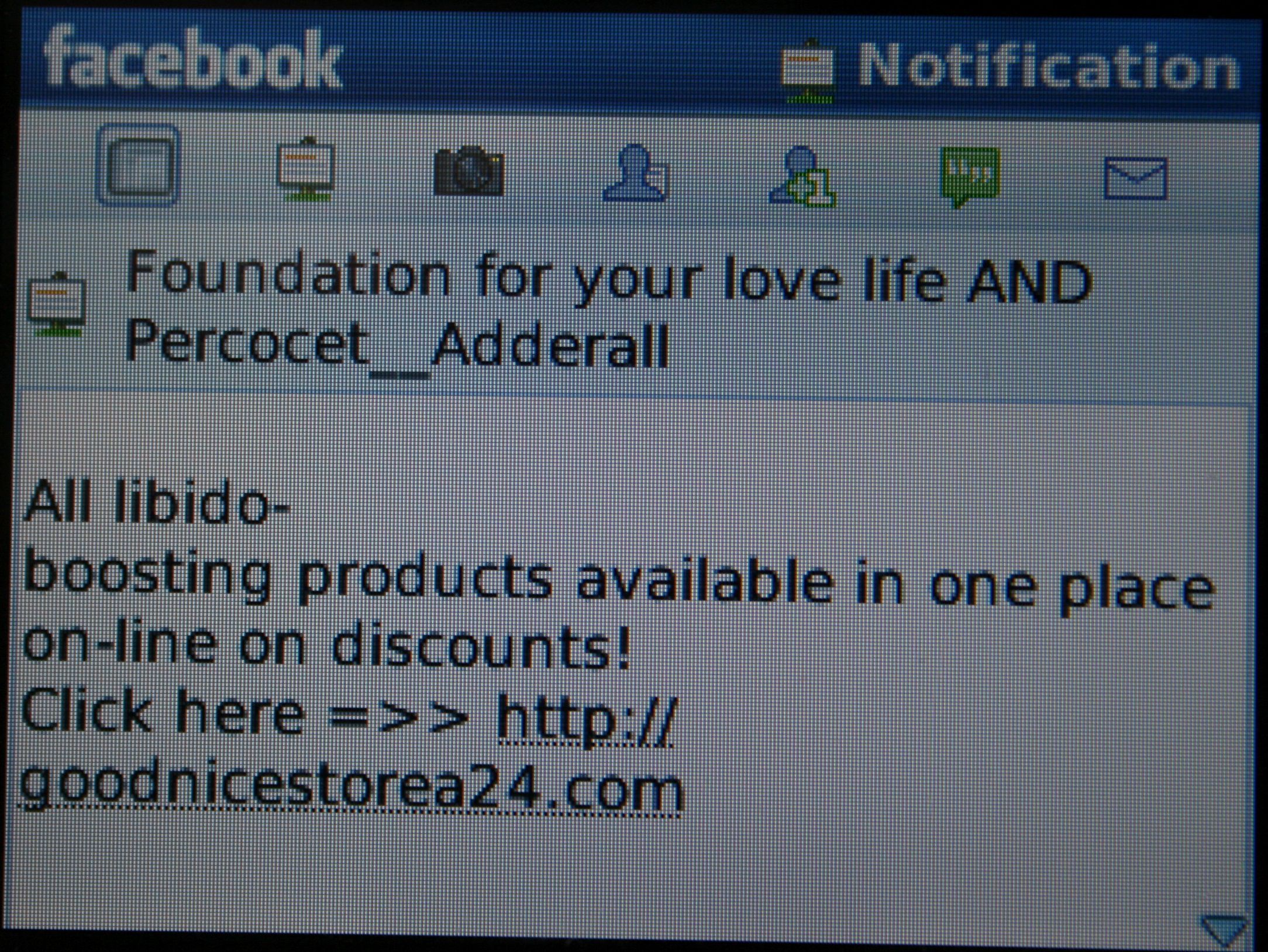
I always thought the Facebook Application for BlackBerry was a buggy, slow piece of junk.  Now I have noticed that this application is being abused by spammers to propagate Viagra and Percocet SPAM.  The screen shot to the right is an actual Facebook notification I received on my BlackBerry.

There seems to be an interesting bug in the Facebook Application for BlackBerry in which a spammer can spoof the “facebookmail.com” domain to have SPAM messages show up in your notifications list within the BlackBerry Facebook application.  This only works if you have the Facebook for BlackBerry Application installed AND you have an email account configured on your BlackBerry (yes, this includes a corporate email account as well).  The email account you have configured on your BlackBerry is where you actually receive the SPAM message, not through Facebook.

The Facebook Application for BlackBerry appears to notify on any new email in one of your BlackBerry mailbox’s with “*.facebookmail.com” in the sender or return-path field.  This is a win for the spammer because now you think Facebook is spamming you and with the addition of an email, you’re more tempted to click on the link.  The Facebook Application for BlackBerry is no stranger to controversy and this particular bug has been noticed recently by others as well.  It also appears that this bug only affects the BlackBerry Facebook application.  When testing the iPhone app I couldn’t replicate the issue.

To test this bug I used EXIM4 in Ubuntu as a mail relay with mailtools to send the email.  This allowed me to send a spoofed email as “agent0x0@facebookmail.com” to one of the email accounts I have configured on my BlackBerry.  Here are screen shots of the spoofed email in my inbox and what it looks like in the Facebook Application for BlackBerry:

My opinion is that a mobile Facebook application should never be polling your personal email for these messages…but then again this could be a “feature” of this nicely designed application, right? :-)   Special thanks to Kevin Johnson for helping with some of the research/testing.

Share and Enjoy


FacebookTwitterDeliciousDiggStumbleUponAdd to favoritesEmailRSS


Using Google Buzz Can Expose Your Gmail Address

I’ve discovered another trick that may surprise some, this time relating to Google’s services. I don’t view the issue as a vulnerability, but it likely goes against user privacy expectations. In short, having a public Google profile (which you might have created when checking out Google Buzz) can allow others to figure out your Gmail address.

This really shouldn’t be that surprising, given that your username is generally consistent across Google services, and a public profile is public. But those who currently have numeric profile addresses (e.g. http://www.google.com/profiles/104424237445852766735) might think their profile is not easily tied to their username.

But by using Picasa, Google’s photo sharing service, it’s often quite simple to go from a numeric profile address to an actual username. To protect yourself from this access, visit the Picasa settings page.  Under “Your gallery URL,” add a new username and select the new username for your gallery URL. Also, you may want to edit your nickname.

In my testing thus far, it matters little whether you’ve used Picasa before – if you have a Gmail account, Picasa is also enabled on your account. And while individual Picasa albums have privacy controls, I have not found a way to block simply loading your Picasa home page.

With the introduction of Buzz, Google is encouraging users to take advantage of Google profiles. But in the process, Google is tying together services that many users may have treated quite distinctly in the past. If you want your Gmail address to remain private, you need to manage properly the other Google services you use to avoid one of them exposing your Gmail username.

Update (Feb. 13): It appears Google has adjusted their services to prevent the original URI trick from working. Previously, adding a profile number to picasaweb.google.com (e.g.  http://picasaweb.google.com/104424237445852766735) would either load a page with the username visible, the username embedded in the page’s source code (_user.name in JavaScript), or an error page in a few particular instances. One configuration that would simply produce an error page was if you had Picasa setup under a different username than your Gmail username, hence my advice. It now seems that using a numeric Picasa URI will either load an error page if the user does have Picasa setup or a page indicating the user does not have Picasa galleries but with no username anywhere in the page.

I’ve already done some preliminary testing to see if Google Reader could also be used to discover usernames, but so far that does not seem possible. Still, it’s wise to be cautious when using a tool that interacts with so many other services.

Facebook StumbleUpon Digg Twitter Instapaper FriendFeed Delicious Google Bookmarks Share/Bookmark

Facebook’s Fluid Definition of Publicly Available Information

In yet another example of security through obscurity, Facebook modified their platform last July to prevent applications from accessing public photo albums for users that were not friends of the logged-in user. Facebook had previously said such applications did not violate the site’s privacy policy, since the behavior followed photo album privacy settings – applications could only load albums marked as visible to “Everyone.”

But “Everyone” is the default privacy setting for photo albums, and many users probably don’t mean for everyone to see their photos. As a CNET report noted:

A Facebook spokesperson said the company made the change so the technology more closely matched users’ privacy expectations.

“We made this change in order to ensure that users who have their profiles set to a privacy other than ‘everyone’ are not surprised by photos being exposed through the API,” Facebook engineer Matt Trainer wrote in response to complaints on the developer forum site.

In other words, Facebook introduced inconsistent application of privacy settings (are the albums available to everyone or not?) so that users would continue to believe a false representation of who could access their content.

Fast forward to 2010, as Facebook users grapple with revamped privacy controls, new default settings, and the general introduction of “publicly available information,” or PAI. With the announcement of PAI, Facebook removed users’ ability to control access for certain bits of information. Among the data now included in the PAI category: the list of your Facebook friends.

That particular change riled many critics, and Facebook eventually backpedaled a bit, allowing users to remove friends lists from their profiles. But the company made quite clear that your list of friends was still considered publicly available information. With this behavior, Facebook setup a strange distinction between permission and visibility. Everyone was technically allowed to see your friends list, but had no means to do so if you removed it from your profile.

Of course, it wasn’t long before someone discovered a “means to do so.” In December, I posted a simple trick that would reveal the names and profile pages of any user’s friends, regardless of whether they blocked such a list on their profile. I try to follow principles of responsible disclosure with security vulnerabilities, but in this case, my “hack” in no way violated or worked around Facebook’s stated privacy policy, since friends lists were now public.

But the other day, I tried using my trick once more, and noticed that it no longer worked for users who chose to hide their friends lists. I’ve also found that issuing an FQL query for the friends list of a user beside the currently logged-in user fails – I don’t recall precisely the behavior of such a command back in December.

Oddly enough, Facebook has yet to block my trick for viewing a user’s public photo albums, which avoids last July’s changes as it does not involve the Facebook API.

It seems Facebook wants to have their cake and eat it too – give users the impression they still maintain control over their data, but still classify the data as public if circumstances warrant. Personally, I think it better for the company to treat “public” information consistently so that any user surprises come now and not later when people discover other means of accessing content.

By the way, a simple adaptation of my photos trick lets you discover a user’s full name based on their profile ID (which, by the way, is included in the filename of every photo you post – and that filename may be maintained if you upload the photo to sites such as Twitter), regardless of their profile privacy. (Some users restrict access to their profile, so trying to load it directly or request their name via the Facebook API Test Console would fail.) Is this new trick a violation of user privacy or a demonstration of “publicly available information?”

Facebook StumbleUpon Digg Twitter Instapaper FriendFeed Delicious Google Bookmarks Share/Bookmark